


DrayTek UK Users' Community Forum
Help, Advice and Solutions from DrayTek Users
AP905 - missing Radio Settings
- Alex
- Topic Author
- Offline
- New Member
-

Less
More
- Posts: 5
- Thank yous received: 0
03 Apr 2026 19:32 #106204
by Alex
AP905 - missing Radio Settings was created by Alex
Hello,
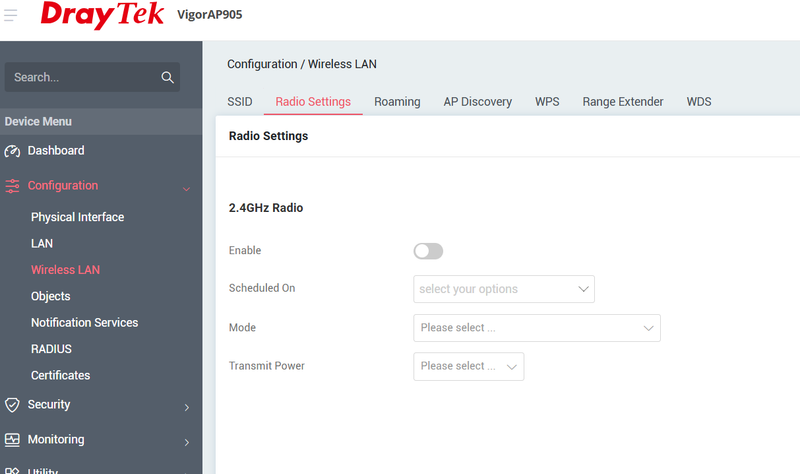
I have a new AP905 which is demonstrating a weird issue in the "Wireless LAN" part of the management portal -
If I make changes to the 2.4GHz settings for RTS Threshold or Fragmentation in "Radio Settings", some of the settings subsequently disappear. I've had this happen twice (with firmware 5.1.0 and 5.1.0.1), requiring a factory reset and reconfiguration - using config backups prior to changes doesn't seem to fix the problem.
None of the options in what remains of the Radio Settings do anything, yet the AP is broadcasting. Also, the 5GHz settings have disappeared.
At the moment, I can't seem to get around this problem.
Here are the SSIDs broadcasting as OK, despite the lack of control, they are all broadcasting OK
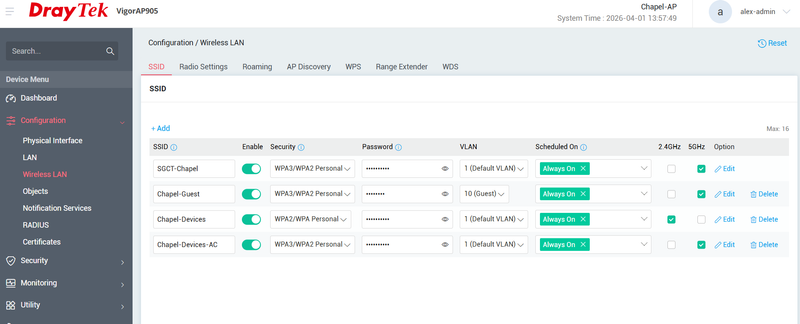
I have a new AP905 which is demonstrating a weird issue in the "Wireless LAN" part of the management portal -
If I make changes to the 2.4GHz settings for RTS Threshold or Fragmentation in "Radio Settings", some of the settings subsequently disappear. I've had this happen twice (with firmware 5.1.0 and 5.1.0.1), requiring a factory reset and reconfiguration - using config backups prior to changes doesn't seem to fix the problem.
None of the options in what remains of the Radio Settings do anything, yet the AP is broadcasting. Also, the 5GHz settings have disappeared.
At the moment, I can't seem to get around this problem.
Here are the SSIDs broadcasting as OK, despite the lack of control, they are all broadcasting OK
Please Log in or Create an account to join the conversation.
- piste basher
- Offline
- Big Contributor
-

Less
More
- Posts: 1284
- Thank yous received: 16
07 Apr 2026 14:08 #106212
by piste basher
Replied by piste basher on topic AP905 - missing Radio Settings
Just to clarify, are you saying that the 2.4GHz radio is broadcasting even though you have it disabled (as per image above)?
Out of interest, is your VLAN10 configured ONLY on the AP905 (i.e. not on your router as well)? I have an AP905 fed from a router with 5 VLANS configured on the router and 5 SSID's. It is only possible to set up the SSID's on the AP905 with the "Default VLAN" - without any VLAN config on the AP905 itself - although they appear to work fine in this way. When I initially set it up with VLANS configured on the AP905 as I thought would be necessary it basically didn't work. I queried this with support and understand that a future firmware might allow VLANS to be configured and selected on the AP905, but at present it all works fine with just "default VLAN".
Out of interest, is your VLAN10 configured ONLY on the AP905 (i.e. not on your router as well)? I have an AP905 fed from a router with 5 VLANS configured on the router and 5 SSID's. It is only possible to set up the SSID's on the AP905 with the "Default VLAN" - without any VLAN config on the AP905 itself - although they appear to work fine in this way. When I initially set it up with VLANS configured on the AP905 as I thought would be necessary it basically didn't work. I queried this with support and understand that a future firmware might allow VLANS to be configured and selected on the AP905, but at present it all works fine with just "default VLAN".
Please Log in or Create an account to join the conversation.
- Alex
- Topic Author
- Offline
- New Member
-
Less
More
- Posts: 5
- Thank yous received: 0
07 Apr 2026 15:00 #106213
by Alex
Replied by Alex on topic AP905 - missing Radio Settings
Hi,
Yes, the 2.4GHz is broadcasting, even though the broken Wi-Fi settings show it as disabled - the "Enable" setting can't be toggled, and all other settings that were there are gone (including 5GHz). Effectively, I can't manage the Wi-Fi radio settings at all, which is concerning.
I've not had a problem with getting VLANs between the 905 and a 2862Lac to work. The 2862 gives an IP on subnet 192.168.11.x for traffic on VLAN10, and 192.168.10.x on the default VLAN - so guests are kept away from devices in the building. This all works like a charm. using firmware 5.1.0.1 (latest), and it worked on 5.1.0.
I've written to DrayTek UK support on this, and I'm awaiting a reply. So far, I'm not confident about using the 905 in a live situation as it appears broken.
Alex.
Yes, the 2.4GHz is broadcasting, even though the broken Wi-Fi settings show it as disabled - the "Enable" setting can't be toggled, and all other settings that were there are gone (including 5GHz). Effectively, I can't manage the Wi-Fi radio settings at all, which is concerning.
I've not had a problem with getting VLANs between the 905 and a 2862Lac to work. The 2862 gives an IP on subnet 192.168.11.x for traffic on VLAN10, and 192.168.10.x on the default VLAN - so guests are kept away from devices in the building. This all works like a charm. using firmware 5.1.0.1 (latest), and it worked on 5.1.0.
I've written to DrayTek UK support on this, and I'm awaiting a reply. So far, I'm not confident about using the 905 in a live situation as it appears broken.
Alex.
Please Log in or Create an account to join the conversation.
- piste basher
- Offline
- Big Contributor
-
Less
More
- Posts: 1284
- Thank yous received: 16
07 Apr 2026 17:21 - 08 Apr 2026 08:21 #106214
by piste basher
Replied by piste basher on topic AP905 - missing Radio Settings
Perhaps I wasn't clear - my AP905 gives out SSID's on subnets 192.168.1.1, 192.168.2.1, 192.168.3.1, 192.168.4.1 and 191.168.5.1, all configured on Default VLAN. The only way I could "attach" one as, say, to your VLAN10 was by adding a VLAN10 on the AP905 itself, and that is what I found to be a source of confusion, since the only LAN available in the drop-down list when doing that is the default VLAN. It also seemed to be an unstable configuration with regards to config syncing as I recall, so I now have no VLANS in the AP905 listing and all works well.
But I don't understand how you could lose access to the interface even after a factory reset, unless the unit is faulty?
PS - why would you want to change the RTS Threshold and Fragmentation settings anyway? Is there a problem with the default values?
But I don't understand how you could lose access to the interface even after a factory reset, unless the unit is faulty?
PS - why would you want to change the RTS Threshold and Fragmentation settings anyway? Is there a problem with the default values?
Last edit: 08 Apr 2026 08:21 by piste basher.
Please Log in or Create an account to join the conversation.
- Ian
- Offline
- New Member
-
Less
More
- Posts: 2
- Thank yous received: 0
08 Apr 2026 12:09 #106218
by Ian
Replied by Ian on topic AP905 - missing Radio Settings
Stab in the dark guess here - you're not trying to manage the 905 from the 2862 are you (i.e. pushing a prodile from one to the other)? I wouldn't expect this to work well due to the generational changes (regardless what Darytel themselves might say about inter-operability).
Please Log in or Create an account to join the conversation.
- the_pit
- Offline
- Junior Member
-

Less
More
- Posts: 70
- Thank yous received: 0
08 Apr 2026 15:35 #106221
by the_pit
Replied by the_pit on topic AP905 - missing Radio Settings
I take you did try another web browser just in case it's doing some dumb caching /plugin interfering or just has an corrupted cookie?
Please Log in or Create an account to join the conversation.
Moderators: Admin3, Christopher