


DrayTek UK Users' Community Forum
Help, Advice and Solutions from DrayTek Users
Intenet speed issue with Vigor 2962 Series
- Alanesi
- Topic Author
- Offline
- New Member
-

Less
More
- Posts: 7
- Thank yous received: 0
24 May 2026 11:42 #106380
by Alanesi
Intenet speed issue with Vigor 2962 Series was created by Alanesi
Hello,
I have a Vigor 2962 Series connected to a 5G router.
If I connect the 5G router directly to the PC, I get a high-speed internet of about 400 Mbps. But when I connect the Vigor 2962 Series, I get a slow speed of 50 Mbps.
All bandwidth management services are disabled. MTU is set to 1500.
Your help is much appreciated!
I have a Vigor 2962 Series connected to a 5G router.
If I connect the 5G router directly to the PC, I get a high-speed internet of about 400 Mbps. But when I connect the Vigor 2962 Series, I get a slow speed of 50 Mbps.
All bandwidth management services are disabled. MTU is set to 1500.
Your help is much appreciated!
Please Log in or Create an account to join the conversation.
- HodgesanDY
- Offline
- Member
-

Less
More
- Posts: 336
- Thank yous received: 27
27 May 2026 18:03 #106396
by HodgesanDY
Replied by HodgesanDY on topic Intenet speed issue with Vigor 2962 Series
Hi,
How is the 5G Router connected to the 2962, is it via an Ethernet port or is it a USB 5G?I have a Vigor 2962 Series connected to a 5G router.
Please Log in or Create an account to join the conversation.
- Alanesi
- Topic Author
- Offline
- New Member
-
Less
More
- Posts: 7
- Thank yous received: 0
27 May 2026 19:35 #106397
by Alanesi
Replied by Alanesi on topic Intenet speed issue with Vigor 2962 Series
It's connected via Ethernet WAN port 1.
And my LAN is connected via LAN port 6
And my LAN is connected via LAN port 6
Please Log in or Create an account to join the conversation.
- Alanesi
- Topic Author
- Offline
- New Member
-
Less
More
- Posts: 7
- Thank yous received: 0
02 Jun 2026 06:07 #106410
by Alanesi
Replied by Alanesi on topic Intenet speed issue with Vigor 2962 Series
Can someone help, please
Please Log in or Create an account to join the conversation.
- Ian
- Offline
- Junior Member
-

Less
More
- Posts: 18
- Thank yous received: 0
02 Jun 2026 09:22 #106411
by Ian
Replied by Ian on topic Intenet speed issue with Vigor 2962 Series
Maybe attach some screenshots of the config of both devices - maybe then somebody will spot something - as it stands you aren't giving a lot to go on.
You say MTU is set at 1500 - lovely - but where? on the 5G router or the Draytek or both - details like that will matter.
e.g. (from Google AI ): -
The typical Maximum Transmission Unit (MTU) for a 5G router is 1428 or 1420 bytes.
So if your Draytek is set at 1500 then you've got a lot of fragmentation happening when that is involved.
You say MTU is set at 1500 - lovely - but where? on the 5G router or the Draytek or both - details like that will matter.
e.g. (from Google AI ): -
The typical Maximum Transmission Unit (MTU) for a 5G router is 1428 or 1420 bytes.
So if your Draytek is set at 1500 then you've got a lot of fragmentation happening when that is involved.
Please Log in or Create an account to join the conversation.
- Alanesi
- Topic Author
- Offline
- New Member
-
Less
More
- Posts: 7
- Thank yous received: 0
02 Jun 2026 10:23 - 02 Jun 2026 10:26 #106412
by Alanesi
Replied by Alanesi on topic Intenet speed issue with Vigor 2962 Series
Hi @Ian
Actually, there are not that many configurations.
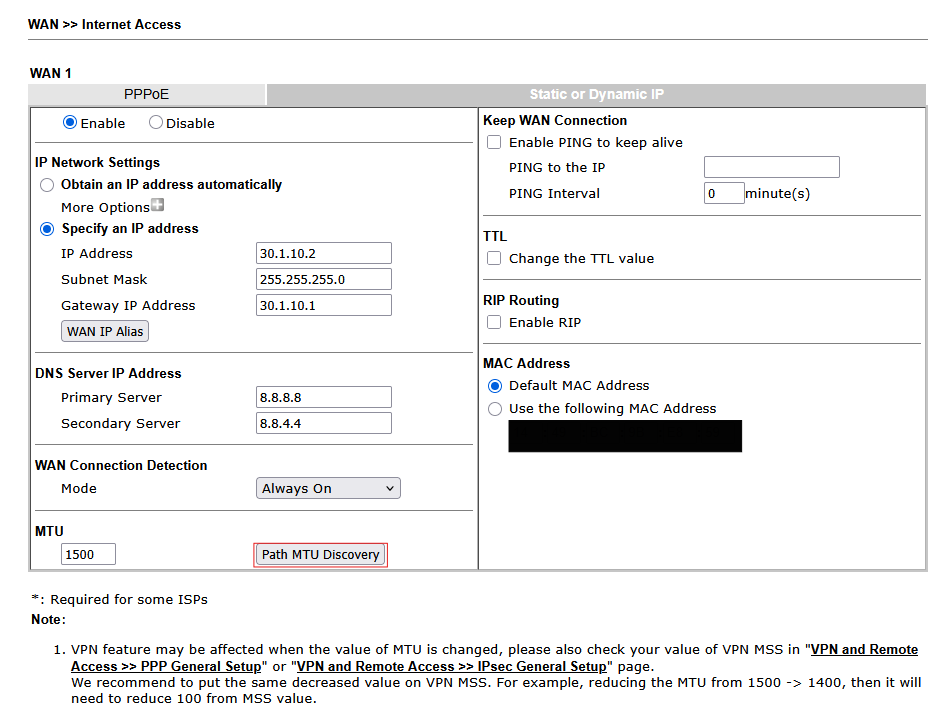
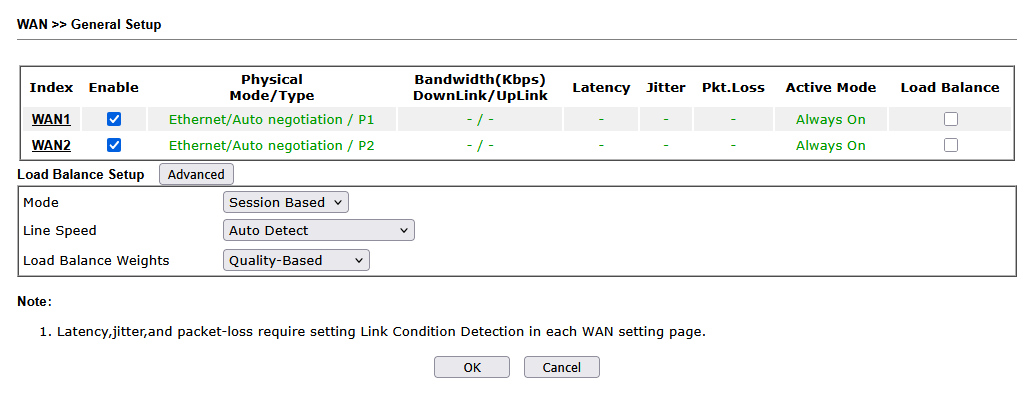
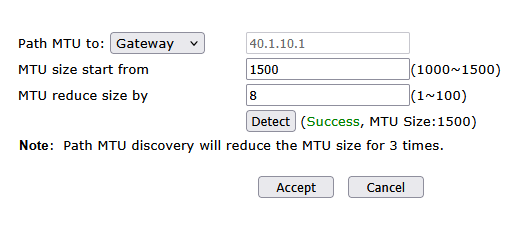
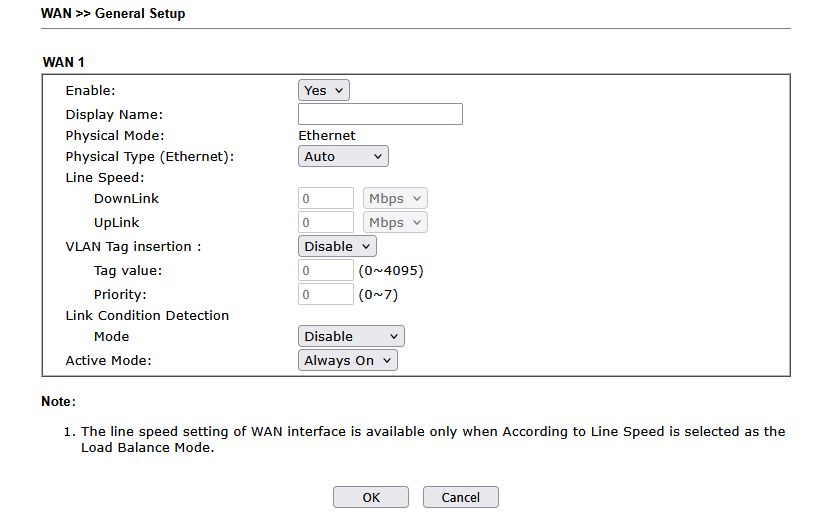
I set the IP address to WAN 1 and WAN 2, and as mentioned, the MTU was only on Draytek and detected automatically, as shown in the pictures. All Bandwidth Management ( Sessions Limit, Bandwidth Limit, Quality of Service, and APP QoS) are disabled, and also the WAN Budget is disabled.
I tried with one WAN only, but it's still the same issue.
Actually, there are not that many configurations.
I set the IP address to WAN 1 and WAN 2, and as mentioned, the MTU was only on Draytek and detected automatically, as shown in the pictures. All Bandwidth Management ( Sessions Limit, Bandwidth Limit, Quality of Service, and APP QoS) are disabled, and also the WAN Budget is disabled.
I tried with one WAN only, but it's still the same issue.
Attachments:
Last edit: 02 Jun 2026 10:26 by Alanesi.
Please Log in or Create an account to join the conversation.
Moderators: Admin3, Christopher