


DrayTek UK Users' Community Forum
Help, Advice and Solutions from DrayTek Users
Initial experience with 2928
- piste basher
- Topic Author
- Offline
- Big Contributor
-

Less
More
- Posts: 1334
- Thank yous received: 19
29 Aug 2026 21:05 - 30 Aug 2026 08:10 #106901
by piste basher
Initial experience with 2928 was created by piste basher
I've just changed from a 2927ax to a 2928 (on 5.4.3.1) and thought I'd report on my initial experience in the event that it might be of help to others. For comparison purposes I didn't change any other network devices when I swapped the routers.
Firstly, on the WAN side I have two WAN connections, one a Zen vdsl PPPoE connection on a Draytek 130 modem (WAN1) and the other a TPLink 5G router connected via a Static IP on WAN3. Both were straightforward to set up and haven't given any issues. On the plus side the Load Balancing feature actually seems to work, the 2927ax never made much use of the 5G connection for some reason (I use IP based balancing as it seems that dial-in VPN users do not get an internet connection if Session based is used).
The only "issue" I've noticed is that under "Monitoring - Remote DSL Status" the vdsl information from the 130 is not displayed on the Dashboard - as no info is provided as to any "expected" modem I have no idea if this is specific to the 130.
Secondly, on the LAN side there do seem to be some serious issues, which I do not have the knowledge to understand. I have 4 VLAN subnets in addition to the default LAN1. On one of these, LAN4, I have (had!) four (different model) Hikvision IP cameras and an NVR, all on fixed IP addresses, and four Amazon Blink devices, all on DHCP. I have Inter-LAN routing switched on between LANS 1 and 4. With the 2927ax, I have always been able to access the Hikvision cameras from PC's on LAN1 and from my phone, either when it is wifi connected to LAN1 or via a VPN connection to the router. These cameras were also able to send "snapshots" via FTP to a NAS on LAN1.
Using what appeared to be exactly the same settings on the 2928 I found that I was unable to access any of the Hikvision devices from PC's on the LAN and my phone, although the cameras were all functioning and the Hikvision SADP App on a PC was able to "see" them. The cameras could no longer send to the NAS via FTP. Stranger still, from the router I could ping two of the Hikvision cameras from LAN1, but I could not ping the other two cameras nor the NVR from LAN1. NONE of these devices could be pinged from their own gateway address, 192.168.4.1.
After some considerable time and puzzlement I finally gave up and put all of the Hikvision devices onto LAN1 - and hey presto, everything works as it should. Although Inter-LAN routing is still turned on, I can't ping the Blink devices from LAN1, although I can from the LAN4 gateway address - something I couldn't do with any of the Hikvision devices.
I also have a problem when trying to add some "Bind IP to MAC" entries - it seems that one can only add devices that appear in the DHCP lease list, but that not all connected devices (especially some on VLANS other than LAN1) appear on that list. It's also a bit frustrating that one can't easily "see" all LAN connected devices and "sort" entries in the various tables, as was previously possible. On the other hand I can now see how many attempts there are by bad actors to connect to my VPN - I was in blissful ignorance before...
Hope this may be of help - if you're tearing your hair out it may not be you!
Firstly, on the WAN side I have two WAN connections, one a Zen vdsl PPPoE connection on a Draytek 130 modem (WAN1) and the other a TPLink 5G router connected via a Static IP on WAN3. Both were straightforward to set up and haven't given any issues. On the plus side the Load Balancing feature actually seems to work, the 2927ax never made much use of the 5G connection for some reason (I use IP based balancing as it seems that dial-in VPN users do not get an internet connection if Session based is used).
The only "issue" I've noticed is that under "Monitoring - Remote DSL Status" the vdsl information from the 130 is not displayed on the Dashboard - as no info is provided as to any "expected" modem I have no idea if this is specific to the 130.
Secondly, on the LAN side there do seem to be some serious issues, which I do not have the knowledge to understand. I have 4 VLAN subnets in addition to the default LAN1. On one of these, LAN4, I have (had!) four (different model) Hikvision IP cameras and an NVR, all on fixed IP addresses, and four Amazon Blink devices, all on DHCP. I have Inter-LAN routing switched on between LANS 1 and 4. With the 2927ax, I have always been able to access the Hikvision cameras from PC's on LAN1 and from my phone, either when it is wifi connected to LAN1 or via a VPN connection to the router. These cameras were also able to send "snapshots" via FTP to a NAS on LAN1.
Using what appeared to be exactly the same settings on the 2928 I found that I was unable to access any of the Hikvision devices from PC's on the LAN and my phone, although the cameras were all functioning and the Hikvision SADP App on a PC was able to "see" them. The cameras could no longer send to the NAS via FTP. Stranger still, from the router I could ping two of the Hikvision cameras from LAN1, but I could not ping the other two cameras nor the NVR from LAN1. NONE of these devices could be pinged from their own gateway address, 192.168.4.1.
After some considerable time and puzzlement I finally gave up and put all of the Hikvision devices onto LAN1 - and hey presto, everything works as it should. Although Inter-LAN routing is still turned on, I can't ping the Blink devices from LAN1, although I can from the LAN4 gateway address - something I couldn't do with any of the Hikvision devices.
I also have a problem when trying to add some "Bind IP to MAC" entries - it seems that one can only add devices that appear in the DHCP lease list, but that not all connected devices (especially some on VLANS other than LAN1) appear on that list. It's also a bit frustrating that one can't easily "see" all LAN connected devices and "sort" entries in the various tables, as was previously possible. On the other hand I can now see how many attempts there are by bad actors to connect to my VPN - I was in blissful ignorance before...
Hope this may be of help - if you're tearing your hair out it may not be you!
Last edit: 30 Aug 2026 08:10 by piste basher.
The following user(s) said Thank You: HodgesanDY, John
Please Log in or Create an account to join the conversation.
- piste basher
- Topic Author
- Offline
- Big Contributor
-
Less
More
- Posts: 1334
- Thank yous received: 19
19 Sep 2026 09:10 - 19 Sep 2026 09:39 #106950
by piste basher
Replied by piste basher on topic Initial experience with 2928
A small update - since installing firmware 5.4.4 (and now 5.4.4.1) the IPv4 internet connection on WAN 1 now drops every few hours, seemingly at random times, but is restored after a second or two. The IPv6 connection doesn't appear to drop at these times, so I have no idea what's going on? Prior to this firmware the connection appeared to be pretty stable.
Last edit: 19 Sep 2026 09:39 by piste basher.
Please Log in or Create an account to join the conversation.
- Ian
- Offline
- Junior Member
-

Less
More
- Posts: 52
- Thank yous received: 0
19 Sep 2026 11:45 #106952
by Ian
Replied by Ian on topic Initial experience with 2928
Not something I've seen with the two I have access to - the one at home has had both 5.4.4 and 5.4.4.1 with no obvious sign of that.
The work one is running a beta firmware in order to make a direct fibre connection to a BT ADVA box actually work. They're kinda halfway there with that - in that it does now come up, but runs at 500/100 instead of 500/500.
More interesting is that this beta firmware contains a lot of other new stuff like monitoring capabilities that have been missing so far.
The work one is running a beta firmware in order to make a direct fibre connection to a BT ADVA box actually work. They're kinda halfway there with that - in that it does now come up, but runs at 500/100 instead of 500/500.
More interesting is that this beta firmware contains a lot of other new stuff like monitoring capabilities that have been missing so far.
Please Log in or Create an account to join the conversation.
- piste basher
- Topic Author
- Offline
- Big Contributor
-
Less
More
- Posts: 1334
- Thank yous received: 19
19 Sep 2026 12:12 #106954
by piste basher
Replied by piste basher on topic Initial experience with 2928
Interesting - thanks for that Ian. Having just looked again at the logs I can see that both WAN1 (but only IPv4) and WAN3 (which is only IPv4 anyway) go down quite frequently (the messages are actually "interface down, followed by "connection down" , but only for a few seconds), with WAN1 being several times more frequent than WAN3. Definitely a work in progress!
Please Log in or Create an account to join the conversation.
- piste basher
- Topic Author
- Offline
- Big Contributor
-
Less
More
- Posts: 1334
- Thank yous received: 19
27 Sep 2026 08:34 - 27 Sep 2026 08:36 #106992
by piste basher
Replied by piste basher on topic Initial experience with 2928
This WAN 1 "instability" is getting ridiculous - here's the last part of the log from last night (starting time of the disconnections was 19.22). Note the the modem on WAN1 is quite stable (fortunately!) - it's the router which is doing this.
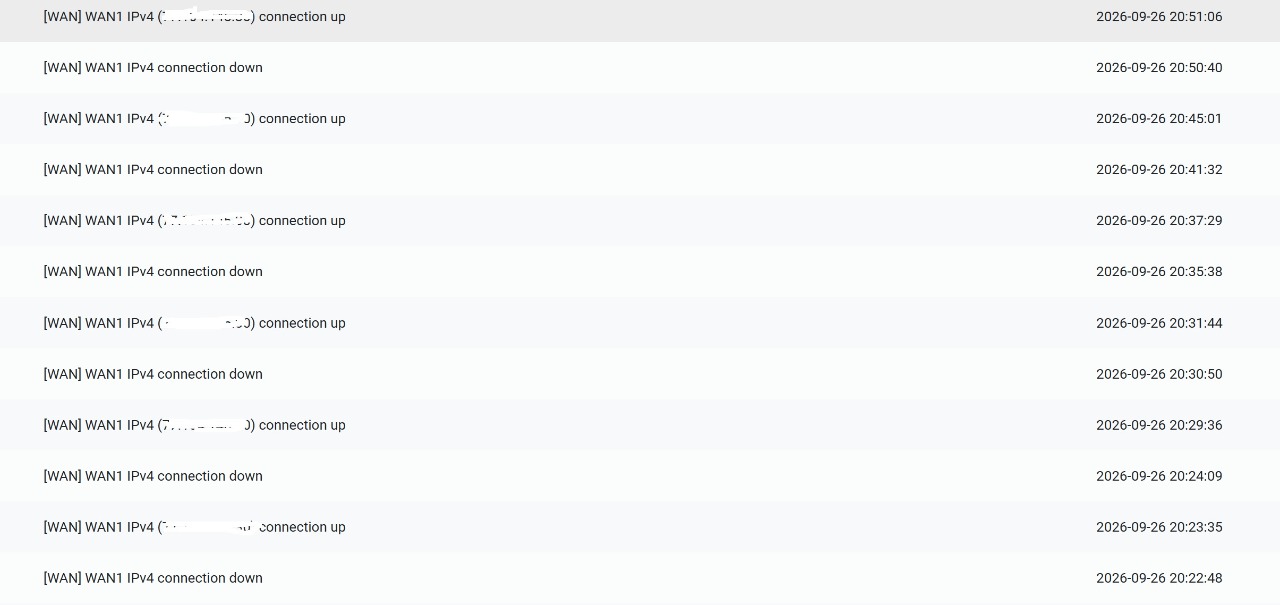
The behaviour stopped after the last entry.
The behaviour stopped after the last entry.
Attachments:
Last edit: 27 Sep 2026 08:36 by piste basher.
Please Log in or Create an account to join the conversation.
- the_pit
- Offline
- Junior Member
-
Less
More
- Posts: 96
- Thank yous received: 0
27 Sep 2026 11:23 #106995
by the_pit
Replied by the_pit on topic Initial experience with 2928
How are you do the connection detection. Via arp or ping?
Please Log in or Create an account to join the conversation.
Moderators: Admin3, Christopher