


DrayTek UK Users' Community Forum
Help, Advice and Solutions from DrayTek Users
Evaluating ACS - Random question(s)
- ctluk
- Topic Author
- Offline
- Junior Member
-

Less
More
- Posts: 70
- Thank yous received: 5
28 Sep 2026 17:47 #107002
by ctluk
Evaluating ACS - Random question(s) was created by ctluk
Hi,
I am just evaluating ACS 3, so far so good but I've got my first random question that I can't seem to find a decent answer to in the manual. I've added 15 devices so far and as per the best practice I've created separate networks for each customer. One of the big things I am evaluating ACS for is for doing scheduled firmware updates, this part I have got working and happy with that (although it is a bit long winded). However I can't see anywhere that I can get an overview of the all devices in environment and what their firmware version is and if they require updates. I've played around with the reports but with the settings I think is right I just get an empty report, settings below:
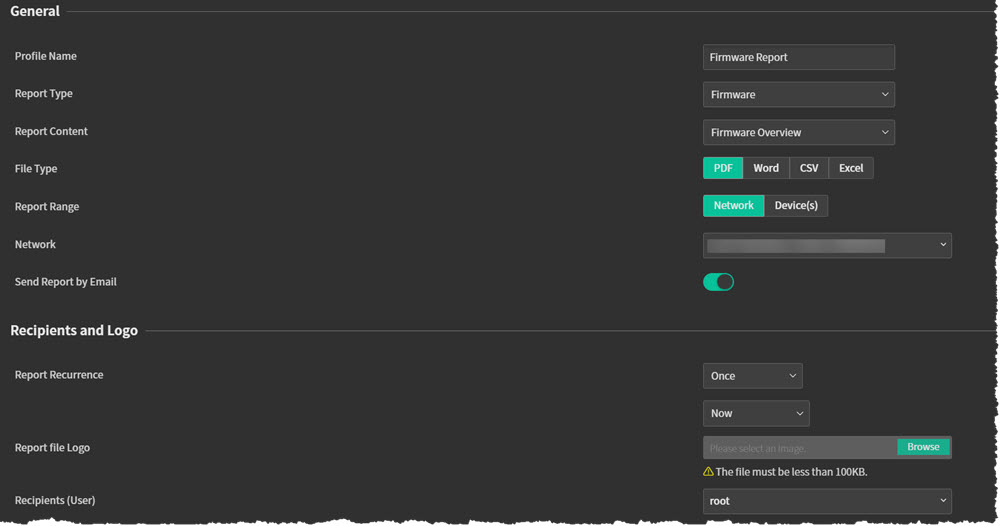
If anyone can help me or point out where I'm being a plank that'll be great

Rob
I am just evaluating ACS 3, so far so good but I've got my first random question that I can't seem to find a decent answer to in the manual. I've added 15 devices so far and as per the best practice I've created separate networks for each customer. One of the big things I am evaluating ACS for is for doing scheduled firmware updates, this part I have got working and happy with that (although it is a bit long winded). However I can't see anywhere that I can get an overview of the all devices in environment and what their firmware version is and if they require updates. I've played around with the reports but with the settings I think is right I just get an empty report, settings below:
If anyone can help me or point out where I'm being a plank that'll be great
Rob
Please Log in or Create an account to join the conversation.
- Ian
- Offline
- Junior Member
-
Less
More
- Posts: 52
- Thank yous received: 0
29 Sep 2026 14:51 #107016
by Ian
Replied by Ian on topic Evaluating ACS - Random question(s)
Using the Cloud version here -
Monitoring / Devices - Shows all devices with various details including the firmware and an vague indication of it's 'newness'.
Your Firmware report 'looks' OK. I assume you've just grey-ed out the networks AND that the root user actually has an email address assigned to it AND that you've configured some form of mail transport to actually get it out of the box (User/Mail Server) ?
Monitoring / Devices - Shows all devices with various details including the firmware and an vague indication of it's 'newness'.
Your Firmware report 'looks' OK. I assume you've just grey-ed out the networks AND that the root user actually has an email address assigned to it AND that you've configured some form of mail transport to actually get it out of the box (User/Mail Server) ?
Please Log in or Create an account to join the conversation.
- ctluk
- Topic Author
- Offline
- Junior Member
-
Less
More
- Posts: 70
- Thank yous received: 5
29 Sep 2026 15:14 #107017
by ctluk
Replied by ctluk on topic Evaluating ACS - Random question(s)
Hi Ian
Thanks for the reply, I hadn't see that device menu so thanks of the heads up there. Shame it doesn't put an icon or a highlight to show if a device needs updating, seems like a fundamental function to me.
Yeah I've greyed out the network names, root has an email address and SMTP is all configured and working. The report arrives it's just blank, which I know isn't correct as there are a couple of devices that are out of date.
Cheers
Thanks for the reply, I hadn't see that device menu so thanks of the heads up there. Shame it doesn't put an icon or a highlight to show if a device needs updating, seems like a fundamental function to me.
Yeah I've greyed out the network names, root has an email address and SMTP is all configured and working. The report arrives it's just blank, which I know isn't correct as there are a couple of devices that are out of date.
Cheers
Please Log in or Create an account to join the conversation.
- Ian
- Offline
- Junior Member
-
Less
More
- Posts: 52
- Thank yous received: 0
29 Sep 2026 15:20 #107018
by Ian
Replied by Ian on topic Evaluating ACS - Random question(s)
The report should show every device in the networks you've selected - not just those needing updates. It's working absolutely fine for me so I'm not sure where yours is going wrong.
The Device view has the green ticks next to the firmware version - the colour and icon changes depending on the firmware age and whether there's something newer available - so there is an indication - it's just a bit vague.
The Device view has the green ticks next to the firmware version - the colour and icon changes depending on the firmware age and whether there's something newer available - so there is an indication - it's just a bit vague.
Please Log in or Create an account to join the conversation.
- ctluk
- Topic Author
- Offline
- Junior Member
-
Less
More
- Posts: 70
- Thank yous received: 5
29 Sep 2026 16:32 #107021
by ctluk
Replied by ctluk on topic Evaluating ACS - Random question(s)
It looks like I had to add all the networks (I was only selecting a couple) and now the report runs and contains data, the data isn't that useful but hey, it's working
The colour doesn't appear to change (on prem version here) I have one test router that has an old firmware version on it and it still shows green. The thought of having to go through each router and manually check version numbers is already sending me to sleep.
Thanks for the pointers, appreciate the replies!
The colour doesn't appear to change (on prem version here) I have one test router that has an old firmware version on it and it still shows green. The thought of having to go through each router and manually check version numbers is already sending me to sleep.
Thanks for the pointers, appreciate the replies!
Please Log in or Create an account to join the conversation.
- Ian
- Offline
- Junior Member
-
Less
More
- Posts: 52
- Thank yous received: 0
29 Sep 2026 17:00 #107022
by Ian
Replied by Ian on topic Evaluating ACS - Random question(s)
You can see what I mean - at least a little in this ACS3 video on YouTube (from 34m00s onwards)
https://youtu.be/8-2yoX1g7qU?si=Kg_qTJ3SArsmr_tf
I *think* the later firmware has to have been uploaded into ACS filestore for this to work.
https://youtu.be/8-2yoX1g7qU?si=Kg_qTJ3SArsmr_tf
I *think* the later firmware has to have been uploaded into ACS filestore for this to work.
Please Log in or Create an account to join the conversation.
Moderators: Admin3, Christopher